
UPC: 0819927010852 | Plugable 13-in-1 USB-C Triple Monitor Docking Station with 100W Charging Compatible with Windows Mac and Chrome with Thunderbolt or USB-C (3x HDMI 1x USB-C 4x USB Ethernet SD Card Reader)



 Sold By: Plugable
 Sold By: Amazon
- At walmart.com you can purchase Plugable 13-in-1 USB-C Triple Monitor Docking Station with 100W Charging Compatible with Windows Mac and Chrome with Thunderbolt or USB-C (3x HDMI 1x USB-C 4x USB Ethernet SD Card Reader) for only
- The lowest price of Plugable 13-in-1 USB-C Triple Monitor Docking Station with 100W Charging Compatible with Windows Mac and Chrome with Thunderbolt or USB-C (3x HDMI 1x USB-C 4x USB Ethernet SD Card Reader) was obtained on June 26, 2026 5:49 pm.
Description
UPC lookup results for: 0819927010852 | Plugable 13-in-1 USB-C Triple Monitor Docking Station with 100W Charging Compatible with Windows Mac and Chrome with Thunderbolt or USB-C (3x HDMI 1x USB-C 4x USB Ethernet SD Card Reader)
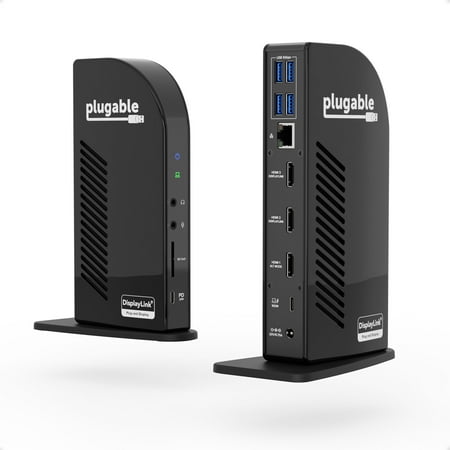
A Plugable classic the Triple Display Docking Station (UD-ULTCDL) gets a modern refresh with streamlined display connections and a major power boost. When we started redesigning one of our most loved triple display docking stations we started with the video ports. This laptop docking station features three HDMI ports for a crisp clear picture on all three screens. Easy setup for your HDMI monitors without reaching for an adapter. But we didn’t just want to modernize the display options. We wanted this USB C dock to embrace the needs of modern technology. And that means adding more power. The redesigned UD-ULTCDL offers 100W Power Delivery (96W certified) and room to charge your connected devices through the front facing USB-C port (20W PD). Crisp Clear Picture A docking station triple monitor setup gives you ample space to spread out. And when it comes to connecting monitors HDMI is arguably the most common connection type. Our pure HDMI port configuration (1x HDMI 1.4 2x HDMI 1.3) capitalizes on that and eliminates the legacy connections. In a typical triple monitor setup the main screen is in the middle with the auxiliary screens placed on either side. This Windows Chrome or Mac docking station takes advantage of that so when setting up a host that supports DisplayPort Alternate Mode consider connecting your main display to the HDMI 1.4 port for resolutions up to 4k 30Hz. Your two flanking screens will look great with resolutions up to 1920×1200 @ 60Hz (HDMI 1.3). Ports a Plenty In addition to the 100W charging to power your laptop—so you can leave the charger it came with in the bag—the UD-ULTCDL has a front-facing USB-C port for 5Gpbs data transfer and 20W charging to accommodate your phone or other devices. Speaking of peripherals the UD-ULTCDL has a total of 13 ports including 4x USB 3.0 ports for 5Gbps data transfer rates an SD Card Reader a Gigabit Ethernet port and separate audio in and audio out ports. Power On Power Delivery—charging your laptop through a USB-C port—can get confusing. How much power is enough? How much is too much? This docking station has you covered with 100W charging capability (96W certified) so you have enough power to charge just about any laptop—even under a heavy workload. And if your laptop needs less power the dock communicates with your computer to negotiate the right charge level. Compatible with Windows 11 Windows 10 and macOS 11+ systems with Thunderbolt 4 / 3 USB4 and USB-C the UD-ULTCDL is compatible with most modern laptops. But what if your laptop only supports one monitor? By tapping into the potential provided by DisplayLink Technology the dock manages the screens. That means you’ll get the same resolution specs on three screens no matter what full-featured USB-C-enabled laptop you’re using—even an M1 or M2-powered Mac. Just a heads up you will need to download the DisplayLink Manager application to get full functionality for macOS devices. On Windows machines the driver installation is still required but automatic through Windows Update. See important notes regarding Alt Mode and PD compatibility below. DisplayLink Graphics Compatibility Windows drivers be installed by Windows Update (with existing Internet connection) or downloaded from plugable.com. USB graphics require dual-core 2GHz+ CPU. Cannot be mixed with non-DisplayLink USB graphics adapters and drivers (e.g. MCT j5 etc). HDCP/Blu-ray playback not supported